
Loading…
Loading…
How ERPNext lets you tag every transaction with an extra analytical axis — project, branch, territory, salesperson, anything — and slice your P&L and balance sheet by it.
Every finance leader eventually asks a question their chart of accounts can't answer: which project actually made money, which branch is carrying the others, which salesperson's book is profitable once you net out the cost of servicing it. The usual response is to bolt more branches onto the cost-centre tree until it collapses under its own weight. ERPNext offers a cleaner path. Accounting Dimensions let you tag every transaction with one or more extra analytical axes — Project, Branch, Territory, Salesperson, or any DocType you choose — that ride alongside Cost Center rather than replacing it. Because the tag is written onto the underlying ledger entries, you can then re-cut the Profit and Loss statement and the Balance Sheet by that dimension without maintaining a parallel set of accounts. This paper explains, grounded in ERPNext's actual data model, what accounting dimensions are, how they are implemented, how to analyse by them, and the mandatory rules and filters that keep the data clean — plus where an experienced partner earns their keep.
The complete paper — every section, in a clean branded PDF you can share with your team. Free, no email required.
A cost centre is a single hierarchy: each transaction sits at one node, so it can answer only one analytical question. Accounting dimensions are additional, independent axes that ride alongside the cost centre — a single invoice can carry a branch, a project and a salesperson at the same time. Cost Center and Project are built-in dimensions; you add others (Branch, Territory, Sales Person or any DocType) as Accounting Dimensions.
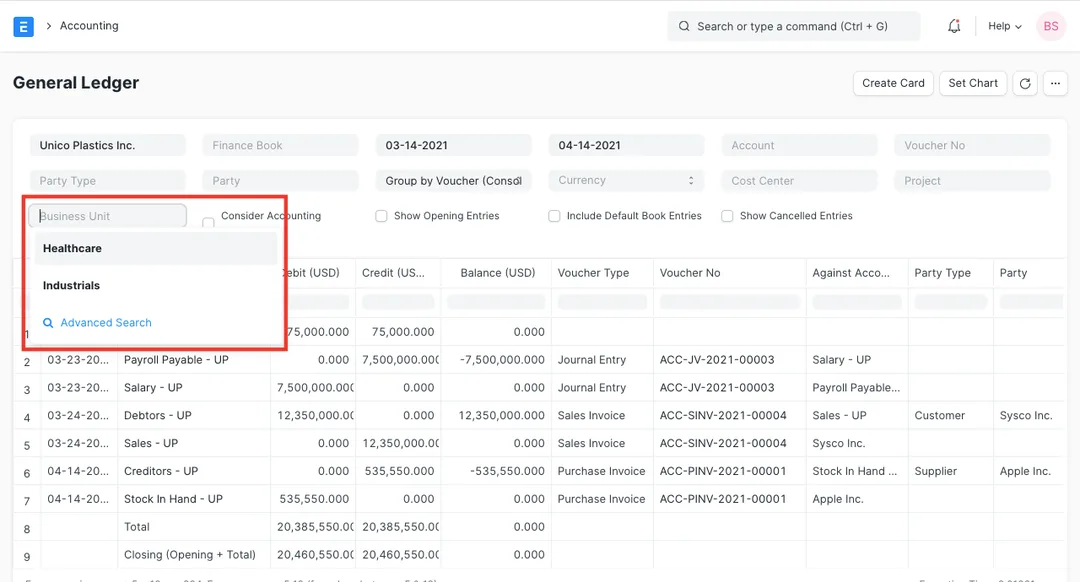
Yes. Because each dimension value is written onto the General Ledger entries a transaction produces, ERPNext's Profit and Loss Statement, Balance Sheet and General Ledger all let you filter by the dimension. Pick a branch, a project, a territory or a salesperson and the statement re-computes to show only entries carrying that tag — a real P&L for that slice, straight from the same books, with no export to Excel.
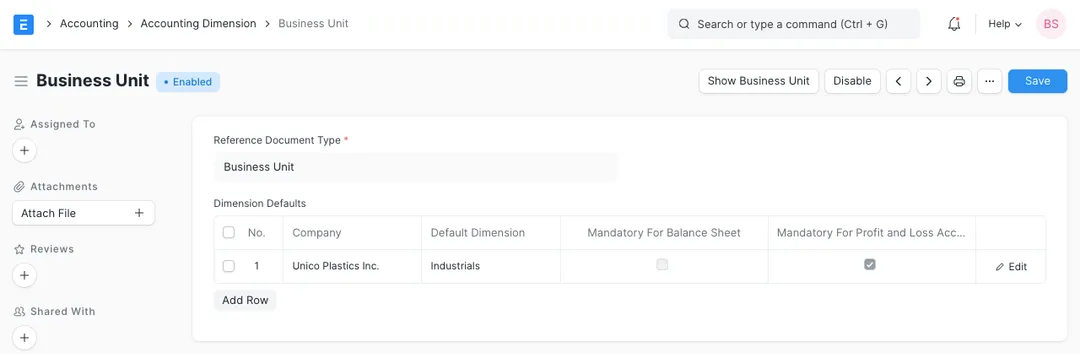
Yes, and the control is deliberately granular. For each company you can set a default value and mark the dimension mandatory — split into 'mandatory for the Profit and Loss' and 'mandatory for the Balance Sheet' separately. You can also use a dimension filter to allow or restrict which values are permitted against which accounts. Enforcing these early, before untagged history accumulates, is what keeps a dimension-filtered report trustworthy.
It's built for it. The defaults, mandatory rules and dimension filters are all configured per company, so each company in a multi-company group gets its own settings for the same dimension. That lets an Indian group standardise its analytical axes — say, branch and project across the group — while tailoring which are mandatory and which values are allowed for each company independently.
Get a clear plan, an honest timeline, and a fixed scope. Talk to a real expert today — whether or not you work with us.
or write to info@acube.co
Kochi (Kadavanthra & Infopark) · Thiruvananthapuram · across India & overseas · In business since 2011