
Loading…
Loading…
How ERPNext imports a bank statement, proposes matches to your payments and invoices, and uses Bank Transaction Rules to auto-classify the rest.
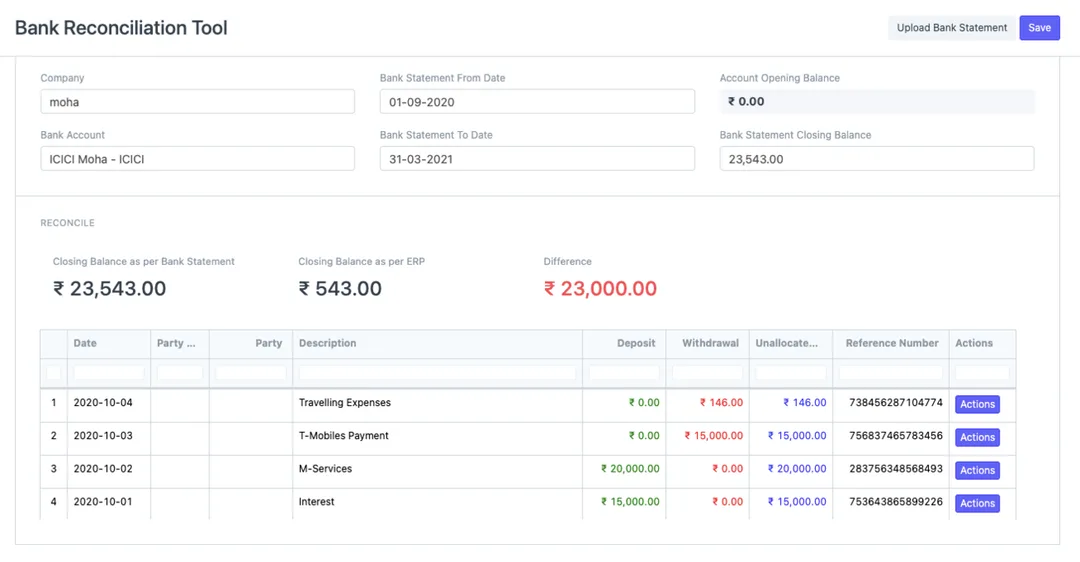
Bank reconciliation is the month-end job everyone underestimates. A busy Indian business runs hundreds or thousands of NEFT, RTGS, UPI and cheque lines through its current accounts, and someone has to tie every one of them back to a payment, an invoice, a bank charge or a transfer. Done by hand in a spreadsheet, it is slow, error-prone and the reason books close late. This paper walks through how ERPNext turns that grind into a mostly-automated flow: import the bank statement once, let the Bank Reconciliation Tool propose ranked matches against your existing vouchers, and set up Bank Transaction Rules so recurring lines — bank charges, interest, a regular vendor — classify themselves. It is grounded in the actual ERPNext doctypes that do the work, and it is honest about where judgement and a clean setup still matter.
The complete paper — every section, in a clean branded PDF you can share with your team. Free, no email required.
Yes. The Bank Statement Import tool takes a CSV or Excel statement exported from any bank's portal and lets you map its columns — date, deposit, withdrawal, description, reference number — to ERPNext's Bank Transaction fields. Because no two Indian banks export the same layout, this mapping matters, but you only do it once per bank: ERPNext saves the mapping and reuses it for every future upload from that bank. It can also read MT940 files and import from a Google Sheet.
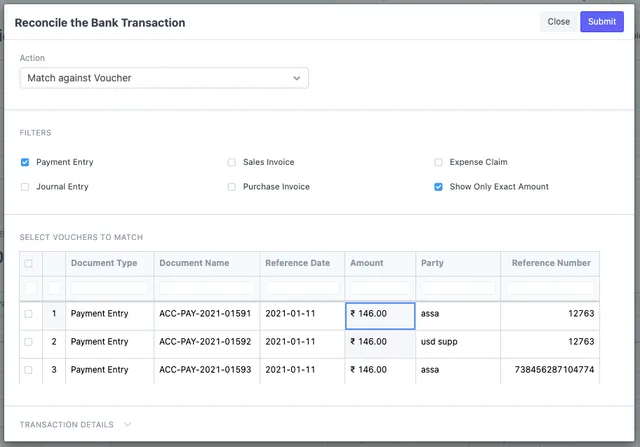
In the Bank Reconciliation Tool you choose Match Against Voucher, and ERPNext searches your existing documents — Payment Entries, Journal Entries, Sales and Purchase Invoice payments, and Expense Claims — then ranks the candidates by how many fields agree: amount, reference number and party. The strongest match, where all three line up, appears at the top. You can filter to exact-amount matches and tick one voucher or several against a single transaction; confirming the match sets the clearance date automatically.
A Bank Transaction Rule auto-classifies recurring statement lines that don't have a matching voucher — bank charges, interest credits, a regular vendor payout, or a sweep between your own accounts. The rule matches on the description (Contains, Starts With, Ends With or Regex), an amount band and the transaction type, then classifies the line as a Bank Entry, Payment Entry or Transfer and pre-sets the account and party. Once a rule exists for a pattern, every future statement carrying it is classified without manual work — this is what lets very large statements reconcile in minutes.
For any statement line with no existing entry in your books, use Create Voucher in the reconciliation tool to book a Payment Entry, Journal Entry or Bank Entry directly against it — filling in details the statement didn't carry, such as the charge and its GST — and submitting both records the entry and sets the clearance date. Better still, once you've seen a recurring charge or interest line, capture it as a Bank Transaction Rule so future occurrences classify themselves automatically.
Get a clear plan, an honest timeline, and a fixed scope. Talk to a real expert today — whether or not you work with us.
or write to info@acube.co
Kochi (Kadavanthra & Infopark) · Thiruvananthapuram · across India & overseas · In business since 2011