
Loading…
Loading…
Why a budget you only check at month-end can't control spend — and how ERPNext enforces limits at the moment a commitment is made.
Most budgets are a report, not a control. They tell you that you overspent — accurately, in detail, and a month too late. By then the purchase order is placed, the material has arrived, and the invoice is already yours to pay. This paper explains how ERPNext turns the budget from an after-the-fact number into a live control that acts at the moment spend is committed. You set a budget against a cost center, a project or an accounting dimension, for a fiscal year, on specific expense accounts. Then you choose what the system does when a transaction would breach it — Stop it, Warn and allow it, or Ignore — and you choose that separately for material requests, purchase orders and actual expenses, and separately again for the annual limit versus the monthly run-rate. Add a monthly distribution to reflect seasonality, and the budget stops being a flat twelfth and starts matching how your business actually spends. The result is spend control that happens before the money is gone, not accounting that explains where it went.
The complete paper — every section, in a clean branded PDF you can share with your team. Free, no email required.
Yes. On a Budget you can apply the control to Purchase Orders and set the action to Stop, which blocks the order from being submitted when it would exceed the budget. You can also choose Warn (show a message but let an authorised user proceed) or Ignore. The same control can be applied independently to Material Requests and to actual-expense bookings, so you catch a breach at the point of commitment rather than only after the invoice is booked.
They are the three control actions ERPNext takes when a transaction would exceed the budget. Stop blocks the transaction — the user cannot submit it. Warn displays a message but still allows an authorised user to submit. Ignore lets the transaction through silently with no block and no warning. You set the action separately for material requests, purchase orders and actual expenses, and separately again for the annual budget versus the accumulated monthly budget.
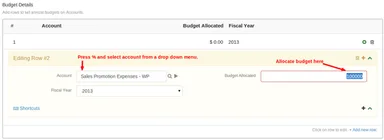
Yes. An ERPNext Budget is defined against a Cost Center, a Project, or a configured accounting dimension. Cost centers cover the departmental view (a team, plant or branch), while budgeting against a Project gives a specific job or engagement its own ceiling. Within the budget you cap individual expense accounts, each with its own amount, so control is line-item rather than a single lump sum.
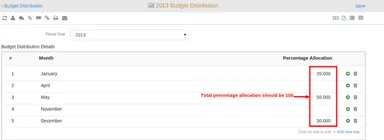
Yes, through the Monthly Distribution. Instead of splitting the annual figure into equal twelfths, you assign a percentage to each month so the run-rate reflects real seasonality — for example higher allocations ahead of Diwali or a festive peak. ERPNext then checks both the annual budget and the accumulated monthly budget to date, with a separate action for each, so seasonal spikes are treated as planned rather than as breaches.
Get a clear plan, an honest timeline, and a fixed scope. Talk to a real expert today — whether or not you work with us.
or write to info@acube.co
Kochi (Kadavanthra & Infopark) · Thiruvananthapuram · across India & overseas · In business since 2011