
Loading…
Loading…
Why booking a year's AMC or subscription in one month distorts your books — and how ERPNext spreads it across the service period automatically.
You raise one invoice for a twelve-month AMC and collect the money upfront — but the revenue isn't earned yet. Booking all of it in the month you invoice inflates that month's profit, starves the next eleven, and quietly breaks the matching principle every auditor tests for. This paper explains deferred revenue in plain terms and shows how ERPNext handles it natively: you flag an invoice line as deferred, give it a service start and end date, point it at a deferred revenue (liability) account, and a scheduled month-end process moves an earned slice from that liability into income each month across the service period. It works the same way in reverse for deferred expense — prepaid insurance, annual software subscriptions, advance rent. The result is revenue that lands in the period it's earned, a clean audit trail, and month-end that reconciles instead of firefights. We ground every claim in ERPNext's actual fields and process, and mark where a partner's setup earns its keep.
The complete paper — every section, in a clean branded PDF you can share with your team. Free, no email required.
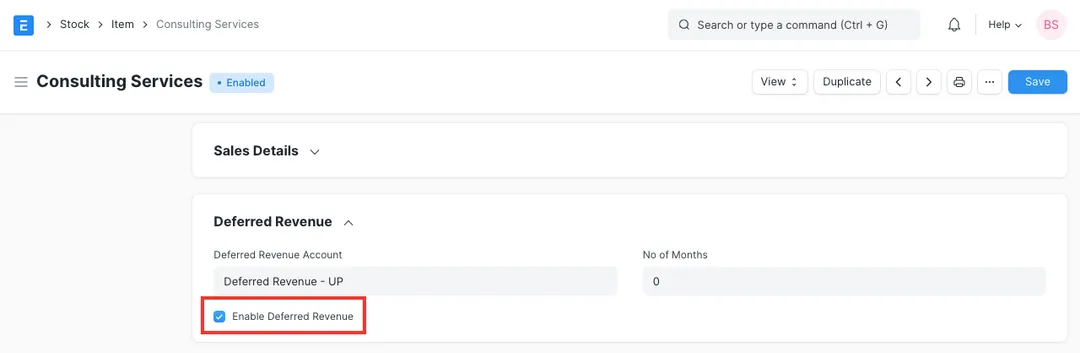
Yes. It's a core feature, not an add-on. On a Sales Invoice line you enable deferred revenue, choose a deferred revenue (liability) account, and set a service start and end date. You can pre-configure this on the Item master so every invoice for that AMC or subscription item inherits it. A scheduled month-end process then recognises the revenue across the service period automatically.
It's a company-wide setting in Accounts Settings — 'Book Deferred Entries Based On' — set to either Months or Days. On 'Months', ERPNext books a fixed amount for each whole month regardless of the number of days, and prorates the part-months at the start and end of the contract. On 'Days', it apportions strictly by day count over the service period. Each period's entry moves the earned slice from the deferred liability into income.
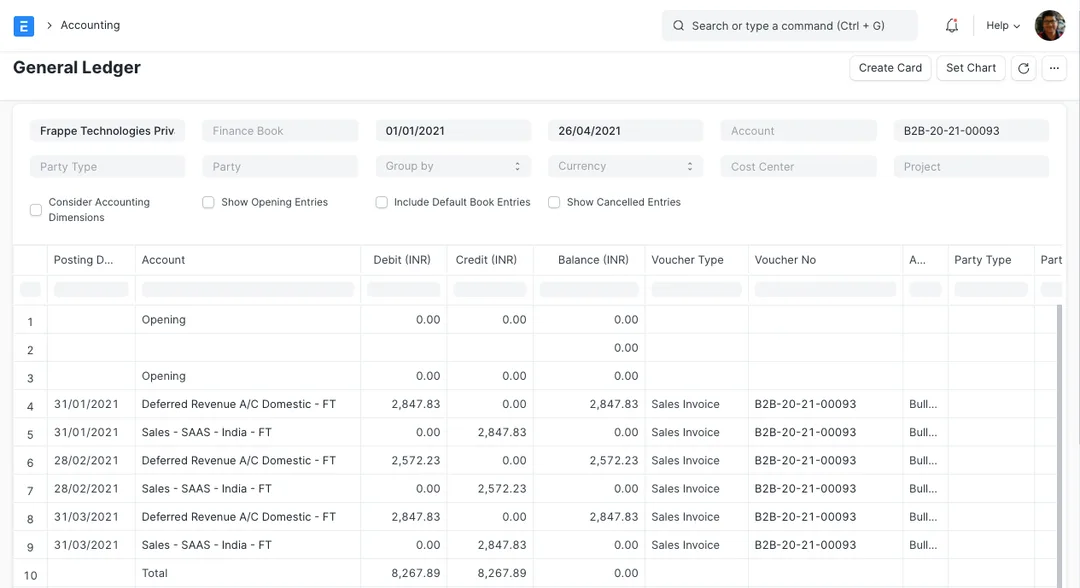
The principle behind it — recognising revenue as performance obligations are satisfied, i.e. over the service period rather than at billing — is exactly what Ind AS 115 (and AS 9) require for AMC, subscription and similar contracts. ERPNext posts each recognition as a dated ledger or journal entry tied to the originating invoice line, so the deferred revenue balance and its movement are fully auditable at year-end. We configure the setup to match your standard and how your auditors expect it presented.
That's deferred expense, and ERPNext handles it the same way in reverse. On the Purchase Invoice line you enable deferred expense, set a deferred expense (prepaid asset) account and the service start and end dates. The same month-end process, run for expenses, moves each period's slice from the prepaid asset into the expense account — so prepaid insurance, annual subscriptions or advance rent hit your P&L evenly across the period they cover instead of in a lump when paid.
Get a clear plan, an honest timeline, and a fixed scope. Talk to a real expert today — whether or not you work with us.
or write to info@acube.co
Kochi (Kadavanthra & Infopark) · Thiruvananthapuram · across India & overseas · In business since 2011