
Loading…
Loading…
How ERPNext's Delivery Trip turns a pile of Delivery Notes into a driver's route — with stops, estimated arrival times, route optimisation and a clean record of what was delivered.
For a distributor, the goods leaving the warehouse is the easy part. The hard part is the last mile — which orders go on which vehicle, in what order the driver visits them, when each customer can expect their delivery, and proof that it actually arrived. Most Indian distributors run this on a WhatsApp group and the driver's memory. This paper explains how ERPNext's Delivery Trip doctype handles it inside the same system that already holds your orders and stock: it groups submitted Delivery Notes into a single driver-and-vehicle route, sequences them as delivery stops, and — using the Google Maps Direction API — optimises the route and estimates arrival time for each stop. It closes the loop with customer email notifications and a per-stop record of what was delivered, so dispatch stops being a black box between 'invoiced' and 'the customer called to ask where it is'.
The complete paper — every section, in a clean branded PDF you can share with your team. Free, no email required.
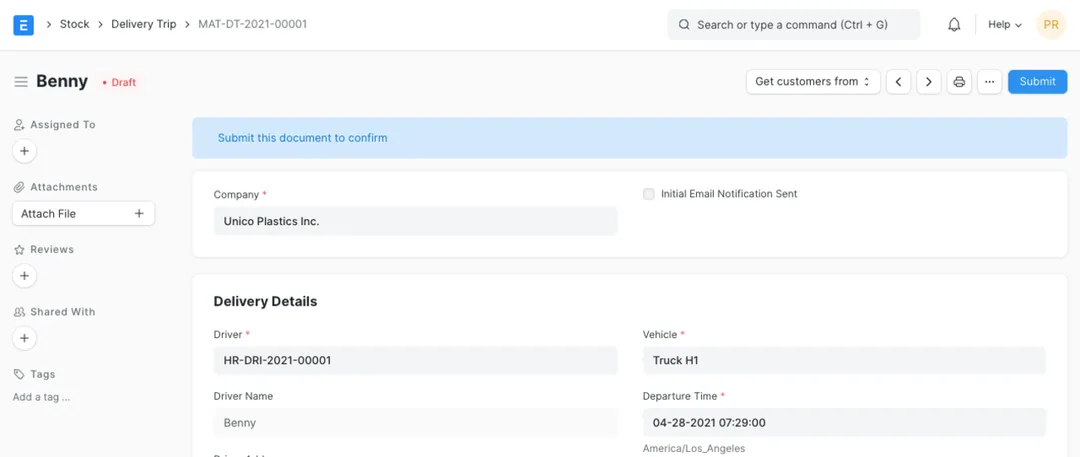
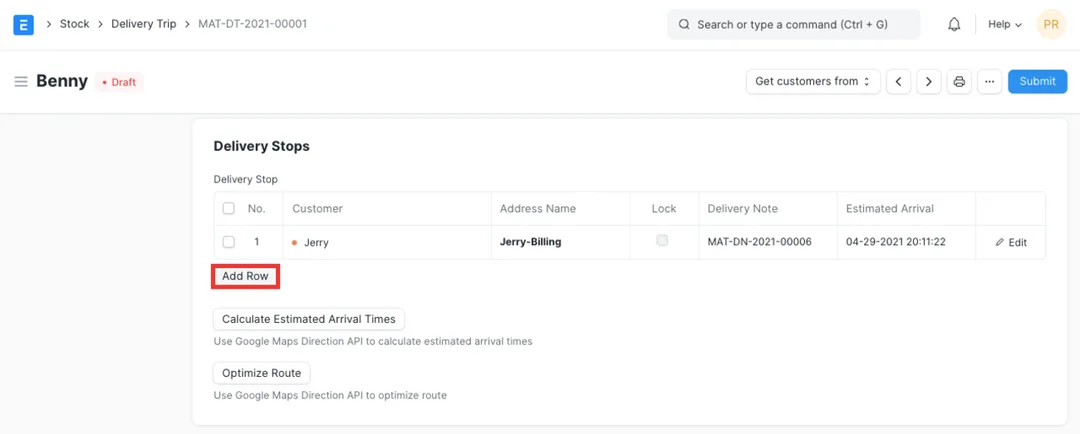
A Delivery Trip is a submittable ERPNext document, in the Stock module, that represents one vehicle's delivery run — a single driver, a vehicle and a departure time, plus an ordered table of delivery stops. Each stop links a customer, a delivery address and the Delivery Note being fulfilled, so a trip turns a set of already-picked orders into a planned, trackable route with a lifecycle status of Draft, Scheduled, In Transit, Completed or Cancelled.
Yes. The Delivery Trip integrates with the Google Maps Direction API. 'Optimize Route' re-sequences the stops into an efficient order rather than the order they were entered, and 'Calculate Estimated Arrival Times' computes a realistic estimated arrival for each stop along with the total trip distance. Both features require a Google Maps API key to be configured in ERPNext, which is a standard part of setting the module up.
The Delivery Trip can send email notifications to the customers on the route when the trip is dispatched. The document tracks whether the initial notification has been sent and records the email address each stop's notice went to, so customers hear from the system rather than from a sales rep chasing the driver. This relies on your ERPNext email settings being configured.
Core ERPNext gives you structured proof: each delivery stop has a Visited flag and a details note, every stop is linked to its Delivery Note (the legal document that goods left your premises and the customer's printable copy), and a completed trip records that the goods reached the customers. Richer doorstep capture — a delivery photo or a digital signature on a phone — isn't part of the core Delivery Trip; it's a common extension a partner adds via a mobile app or custom fields when a distributor needs it.
Get a clear plan, an honest timeline, and a fixed scope. Talk to a real expert today — whether or not you work with us.
or write to info@acube.co
Kochi (Kadavanthra & Infopark) · Thiruvananthapuram · across India & overseas · In business since 2011