
Loading…
Loading…
How ERPNext turns overdue invoices into a structured, escalating collection process — reminders, interest, fees and letters, all from the same ledger.
Most Indian SMEs don't have a profit problem — they have a cash-timing problem. The sale is made, the invoice is raised, and then the money sits in someone else's account for 60, 90, sometimes 120 days. Collections happen by memory and relationship: a WhatsApp here, a phone call there, an awkward silence until quarter-end. This paper explains how ERPNext's Dunning feature replaces that with a structured, repeatable process. A Dunning document is raised against a customer's overdue sales invoices; a Dunning Type sets the level of the reminder — how firmly it's worded, whether interest applies, whether a fee is charged; and the letter text for each level can be printed or emailed on your letterhead. Interest is calculated automatically from the overdue days, the whole thing posts cleanly to your accounts when paid, and every reminder is tracked by status. The goal is simple: get paid faster, without your finance team living inside a spreadsheet of who-owes-what.
The complete paper — every section, in a clean branded PDF you can share with your team. Free, no email required.
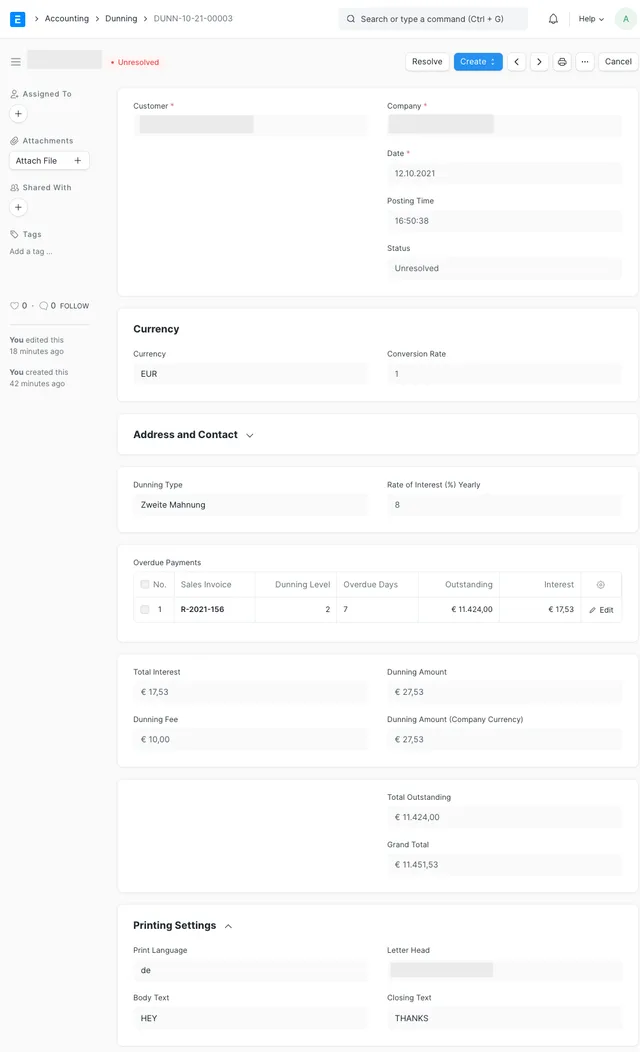
Dunning is ERPNext's built-in process for systematically collecting overdue payments. You raise a Dunning document against a customer; ERPNext fetches their overdue sales invoices (only submitted, past-due invoices with an outstanding balance), applies interest and an optional fee based on the Dunning Type you choose, and lets you print or email a reminder letter. It runs through Draft, Unresolved, Resolved and Cancelled statuses so you always know what's still chasing money.
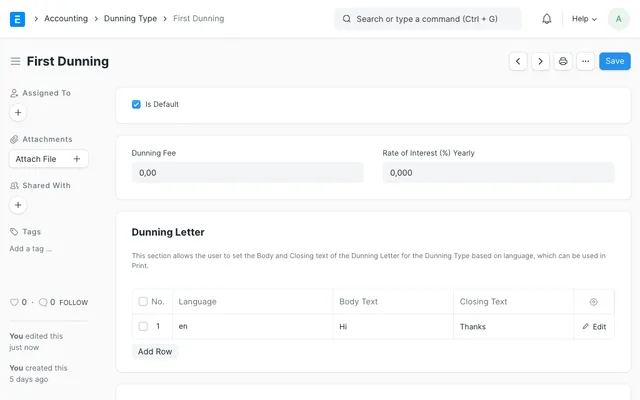
Yes. You set up a Dunning Type for each level of escalation — for example a friendly first reminder with no fee, a firmer second with interest, and a final notice carrying both interest and a fee. Each type holds its own fee, yearly interest rate and letter text, so when you raise a Dunning at a given level, those settings flow through automatically and every reminder of that level is consistent across customers.
ERPNext takes the yearly Rate of Interest from the Dunning Type, converts it to a daily rate, and multiplies it by each overdue invoice's outstanding amount and its actual overdue days (the gap between the invoice's due date and the dunning's posting date). It sums the interest across all overdue invoices and adds the flat dunning fee to arrive at the dunning amount; the grand total is the outstanding balance plus that dunning amount.
From the Dunning document you create a Payment Entry. The interest and dunning fee are booked to the income account you configured on the Dunning Type, and the dunning is marked Resolved automatically — so your receivables and your revenue both reflect the payment without any separate reconciliation.
Get a clear plan, an honest timeline, and a fixed scope. Talk to a real expert today — whether or not you work with us.
or write to info@acube.co
Kochi (Kadavanthra & Infopark) · Thiruvananthapuram · across India & overseas · In business since 2011