
Loading…
Loading…
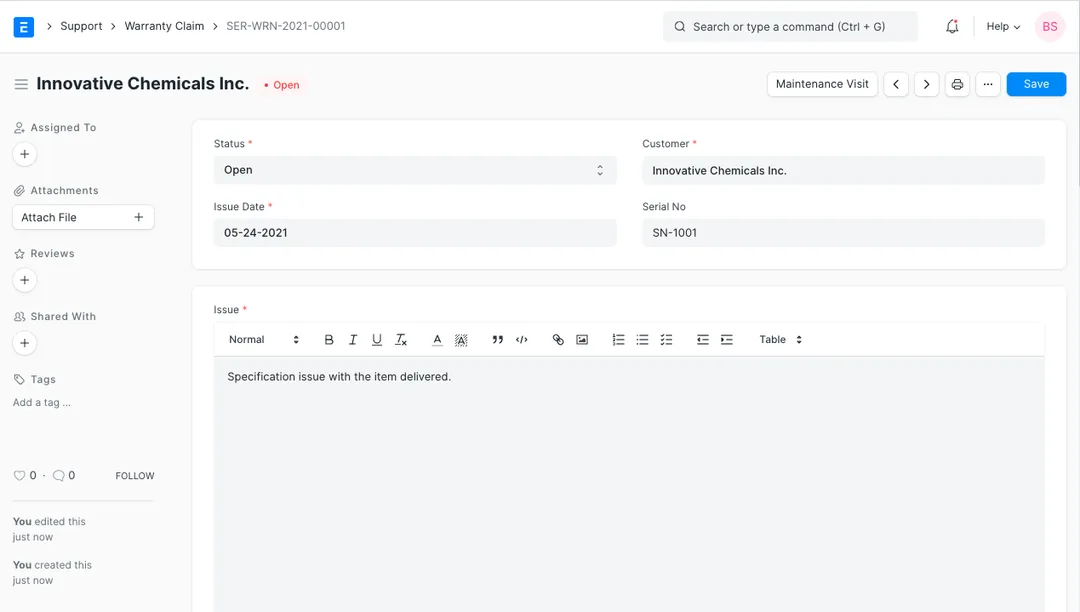
How ERPNext turns an after-sales complaint into a tracked Warranty Claim — linked to the exact serial number, its warranty and AMC status, a resolution, and a Maintenance Visit.
The sale is the easy part. What tells a customer whether they'll buy from you again is what happens the day something goes wrong — the phone call, the complaint, the wait for someone to take ownership. For businesses that sell serialised products under warranty or an AMC, that after-sales moment is usually where the system of record goes quiet: complaints live in inboxes and WhatsApp, nobody's sure whether the unit is still under warranty, and resolutions are never written down. ERPNext closes that gap with a purpose-built Warranty Claim — a document in its Support module that ties a customer complaint to the exact serial number and item, pulls in that unit's warranty and AMC status automatically, tracks the claim through Open, Work In Progress and Closed, records who resolved it and how, and spins up a Maintenance Visit when a technician needs to attend. This paper walks that flow from the real ERPNext doctypes — the Warranty Claim and the warranty fields carried on every Serial No — so you can see exactly what the software does for you, and what discipline it still takes to run after-sales well.
The complete paper — every section, in a clean branded PDF you can share with your team. Free, no email required.
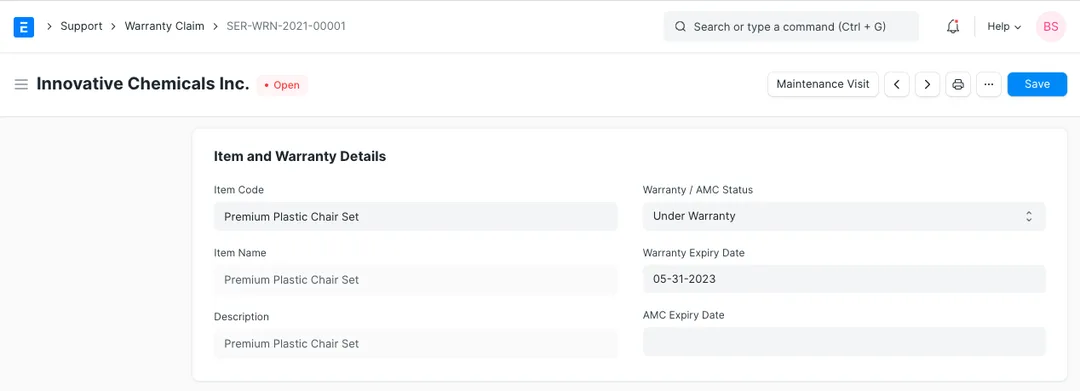
Yes, provided the groundwork is done. Warranty details live on each unit's Serial No record — the Warranty Period (in days), the Warranty Expiry Date, the AMC Expiry Date and a Maintenance Status (Under Warranty, Out of Warranty, Under AMC or Out of AMC). When you raise a Warranty Claim and enter the serial number, ERPNext fetches that status and the expiry dates automatically, so whoever takes the complaint can confirm coverage on the spot rather than digging through old invoices.
Both are tracked on the serial number, but they're separate. The warranty is the coverage that comes with the sale, driven by the Warranty Period on the item and expiring on the Warranty Expiry Date. An AMC (Annual Maintenance Contract) is a paid service contract the customer takes, with its own AMC Expiry Date. The Maintenance Status field reflects which applies — a unit can be Under Warranty, Out of Warranty, Under AMC or Out of AMC — so your team always knows on what basis a repair is being handled.
Directly from a Warranty Claim you can generate a Maintenance Visit — the ERPNext document that records an actual service call, including who attended, what was found and done, and whether the work was fully or partially completed. The Maintenance Visit stays linked to the claim it came from, and ERPNext won't let you cancel a claim while a submitted visit is still attached. For businesses running AMCs, the same Maintenance Visit doctype ties reactive warranty work and planned preventive visits into one service history per unit.
Yes — that's the payoff of anchoring everything to the serial number. Because each Warranty Claim records the serial number, the issue and its resolution, and because Maintenance Visits link back to their claims, a unit accumulates a full history: what went wrong, when, what was done and by whom. That per-unit record is the basis for spotting recurring faults, analysing warranty cost by product, measuring response and resolution times, and feeding real field quality data back to your production or purchasing team.
Get a clear plan, an honest timeline, and a fixed scope. Talk to a real expert today — whether or not you work with us.
or write to info@acube.co
Kochi (Kadavanthra & Infopark) · Thiruvananthapuram · across India & overseas · In business since 2011