
Loading…
Loading…
The automation ERPNext ships with — approvals, alerts, auto-assignment and recurring documents — is configured in the browser, not written in code. Here's what's genuinely no-code, and where light scripting starts.
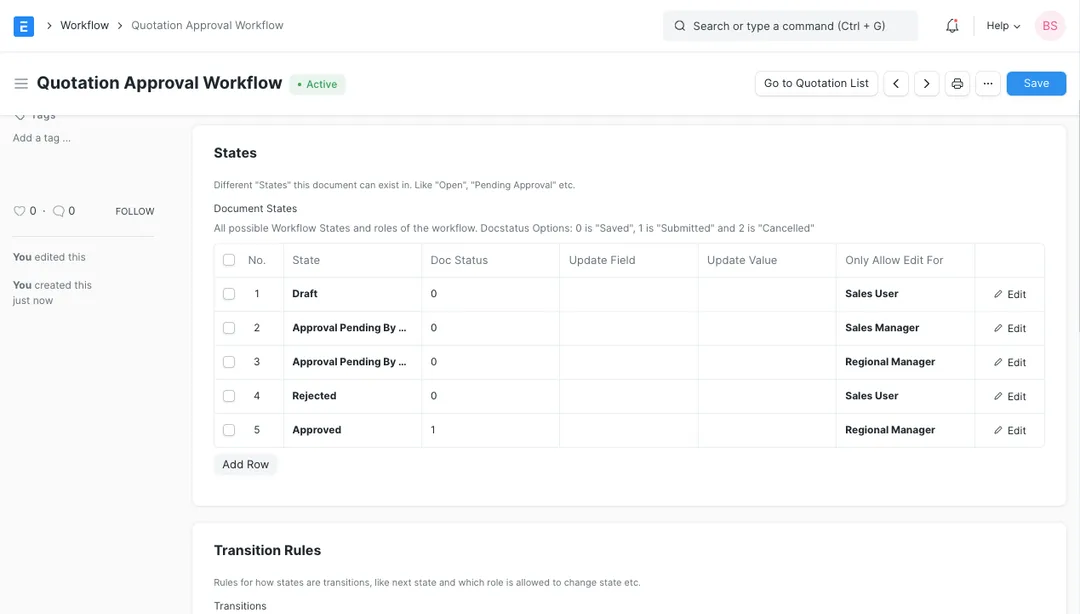
The most common myth about ERPNext is that every bit of automation needs a developer. It doesn't. ERPNext runs on the Frappe framework, and Frappe ships a set of automation tools that are configured entirely in the browser — no code, no deployment. This paper walks through the four you'll use most: Workflows (multi-level approvals with role-based states), Notifications (email and in-app alerts on document events), Assignment Rules (auto-distributing work round-robin or by load) and Auto Repeat (recurring documents on a schedule). Each is real, built-in Frappe functionality your own admins can set up. Then it draws the line honestly: where the no-code tools stop and light scripting — Server Scripts, Client Scripts and scheduled jobs — genuinely earns its place. The goal is to help operations and IT leaders see how much they can automate themselves, and to recognise the point where a developer or partner is the right call rather than a reflex.
The complete paper — every section, in a clean branded PDF you can share with your team. Free, no email required.
For a large share of everyday automation, yes. ERPNext runs on the Frappe framework, which ships Workflows (role-based approvals), Notifications (email and in-app alerts), Assignment Rules (auto-distributing work) and Auto Repeat (recurring documents) — all configured through ordinary forms in the browser, with no code and no deployment. Your own admins can set these up. A developer becomes necessary only when your logic goes beyond what these tools express.
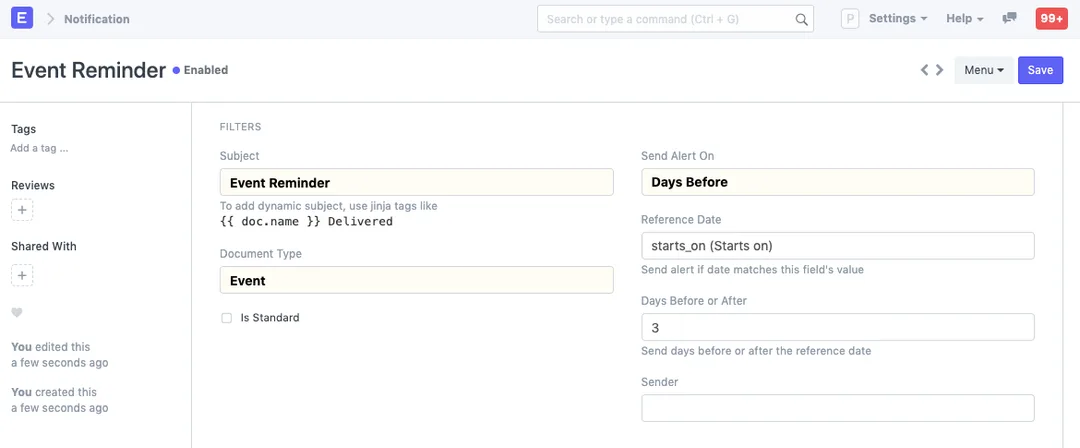
A Workflow controls what can happen to a document — the states it moves through (Draft, Pending, Approved) and which role is allowed to make each move — so it enforces an approval process. A Notification controls who gets told — it sends an email or in-app alert when a document event happens, a field changes, or a date approaches. They're complementary: a Workflow routes the approval, and Notifications keep the right people informed as it moves.
When the rule is more than "on this event, to this person, when this field equals that." Custom validation across several fields, calculations, exposing an API, integrating with another system, or a background job that runs arbitrary logic on a schedule all need light scripting — Server Scripts (Python) or Client Scripts (JavaScript). Frappe lets you enter these in the UI, but they are genuinely code and should be written, reviewed and tested by a developer or partner.
Yes, both without code. A Notification can send a reminder a set number of days before or after a date on a document — for example, before a contract or AMC expires — to a person named on the record. Auto Repeat regenerates a document on a chosen frequency (daily through yearly), so a recurring invoice or monthly journal entry is created automatically, optionally submitted and emailed, instead of being keyed in by hand each cycle.
Get a clear plan, an honest timeline, and a fixed scope. Talk to a real expert today — whether or not you work with us.
or write to info@acube.co
Kochi (Kadavanthra & Infopark) · Thiruvananthapuram · across India & overseas · In business since 2011