
Loading…
Loading…
How ERPNext lets you track stock by rack, bin, shelf, project or any custom axis — recorded on the stock ledger itself, without the warehouse sprawl.
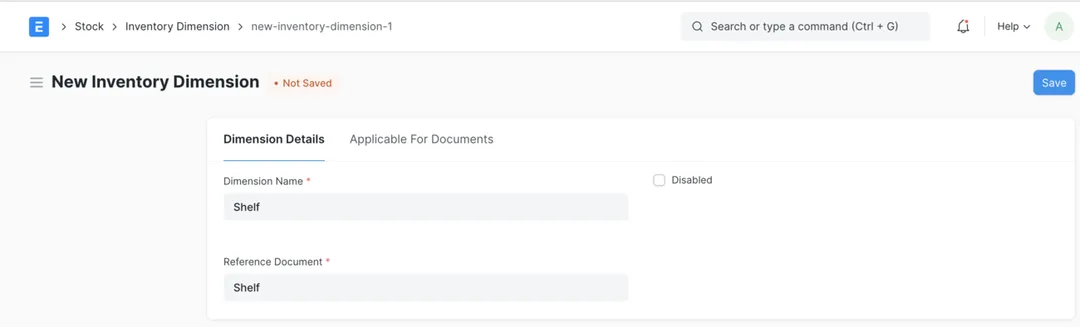
Every growing stockroom eventually hits the same wall: you need to know not just how much of an item you hold and in which warehouse, but exactly where — which rack, which bin, which shelf — or against which project, lot or line. The instinct is to model each of those as a warehouse, and before long you have hundreds of "warehouses" that are really shelves, a stock report nobody can read, and transfers for every physical move. ERPNext's Inventory Dimension feature exists precisely to avoid that. It lets you add an extra tracking axis — a rack, a bin, a project, a storage zone — that ERPNext records directly on the stock ledger alongside the warehouse, so you get dimension-wise stock balances and a dimension-wise ledger without inventing a warehouse for every location. This paper explains what inventory dimensions are, how ERPNext implements them on the stock ledger, where they earn their keep, and how to set them up so they stay clean as you scale.
The complete paper — every section, in a clean branded PDF you can share with your team. Free, no email required.
No — they sit alongside the warehouse. A warehouse is for stock that's genuinely in a different place with its own valuation and its own transfers (a separate godown, a branch, a supplier's premises). An inventory dimension is a finer label on stock in the same warehouse and valuation — a rack, bin, zone or project. Use dimensions so you don't have to create hundreds of pseudo-warehouses for what are really shelves and bins.
Yes — that's exactly what inventory dimensions are for. You define an axis (say Rack or Project), point it at a master list, and ERPNext records that value on every stock movement and on the stock ledger. You keep one warehouse and one valuation, and still get dimension-wise stock balances that tell you what's on Rack A1 or committed to a given project.
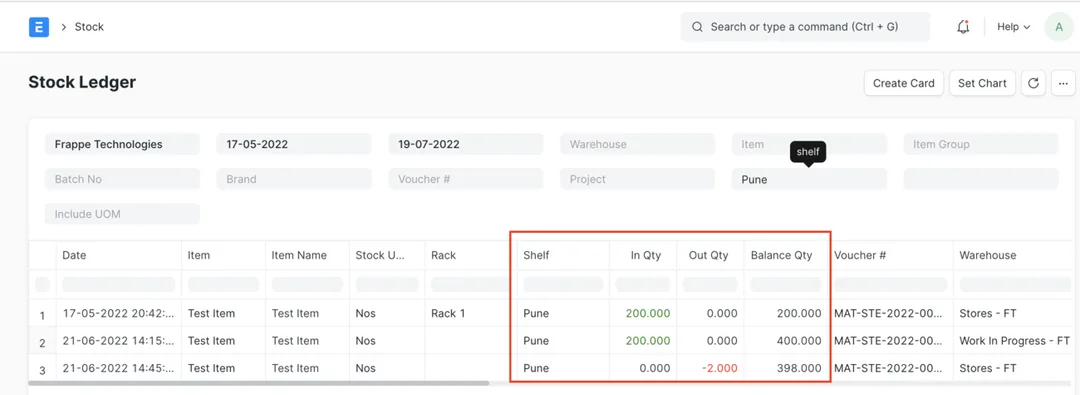
Yes. Because the dimension value is written to the Stock Ledger Entry, the Stock Ledger and Stock Balance reports gain it as both a filter and a column — so you can see in-quantity, out-quantity and running balance per dimension value, and it flows through to the stock closing balance at period end. It's real ledger data, not a cosmetic note on the form.
Once stock transactions exist against a dimension, ERPNext locks its core definition — you can't change the referenced document or the field mapping, though you can still adjust softer settings like its condition, whether it's mandatory, and negative-stock validation. This protects the integrity of your stock history, which is why it's worth deciding the axis you need before go-live rather than reworking it later.
Get a clear plan, an honest timeline, and a fixed scope. Talk to a real expert today — whether or not you work with us.
or write to info@acube.co
Kochi (Kadavanthra & Infopark) · Thiruvananthapuram · across India & overseas · In business since 2011